Introduction
ESPHome-Econet enables fully local, cloud-free control of Rheem water heaters and HVAC systems using ESP32 and ESP8266 microcontrollers.
But even with detailed telemetry, one key question remains:
How efficient is the system right now?
Manufacturer COP (Coefficient of Performance) ratings are measured under ideal lab conditions and rarely reflect real-world usage. Ambient temperature, demand, and operating modes constantly change.
This guide shows how to calculate real-time COP using only the data already available through ESPHome-Econet and Home Assistant.
How It Works (High-Level)
- Measure electrical input power directly from the Rheem unit
- Track how quickly the water temperature increases
- Estimate thermal output using thermodynamics
- Divide output by input to calculate COP
The Idea: Measuring COP from Live Telemetry
Instead of relying on static manufacturer specs, we derive a live efficiency metric using actual operating data from the system.
- Electrical input power (W): Reported directly by the Rheem unit
- Thermal output (Q): Estimated from how quickly water temperature increases
The original implementation and discussion can be found in ESPHome-Econet GitHub Discussion #424.
The Math
The Coefficient of Performance is defined as:
COP = Poutput / Pinput
- P_input: Electrical power (watts)
- P_output: Thermal power delivered to water (watts)
Since thermal output is not directly available, we estimate it using:
P_output ≈ (m × c × ΔT) ÷ t
- m: Water mass (e.g. 50 gallons ≈ 189 kg)
- c: Specific heat of water (4186 J/kg°C)
- ΔT/t: Rate of temperature increase
Implementing Real-Time COP in Home Assistant
This can be implemented entirely using Home Assistant template sensors.
- Track temperature change over time
- Estimate thermal output
- Divide by electrical input
- Filter out invalid states (idle or water draw)
Example Implementation
This simplified template demonstrates the core concept. Adjust constants and filtering based on your setup.
template:
  - sensor:
      - name: "Rheem Real-Time COP"
        unit_of_measurement: "COP"
        state: >
          {% set power_in = states('sensor.rheem_power_usage') | float(0) %}
          {% set temp_rise_per_sec = states('sensor.water_temp_derivative') | float(0) %}

          {% set tank_mass_kg = 189 %}
          {% set specific_heat = 4186 %}

          {% set power_out = temp_rise_per_sec * tank_mass_kg * specific_heat %}

          {% if power_in > 50 and power_out > 0 %}
            {{ (power_out / power_in) | round(2) }}
          {% else %}
            0
          {% endif %}
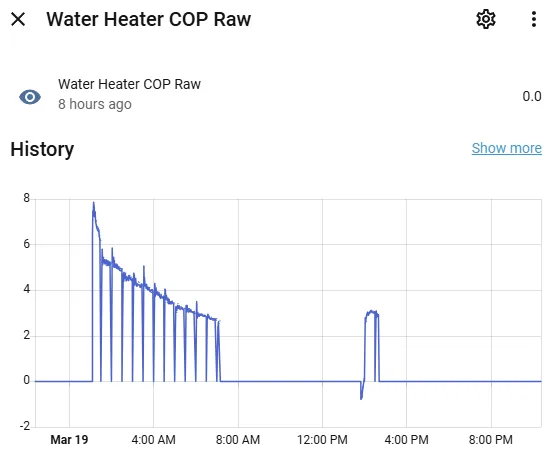
What Is a Good COP?
- 3.0 – 4.0: Excellent efficiency
- 2.0 – 3.0: Normal operation
- 1.0 – 2.0: Reduced efficiency
- < 1.0: Resistance heating (inefficient)
Why Real-Time COP Is Useful
- Real efficiency visibility: Track performance in real conditions
- Better automation: Switch modes based on efficiency
- Diagnostics: Detect degradation early
Accuracy and Limitations
This method provides an estimate rather than a laboratory-grade measurement.
Factors like sensor resolution, tank stratification, and heat loss introduce error. However, the metric is highly useful for trend analysis and relative comparisons.
Conclusion
By combining temperature data with electrical power consumption, you can measure real-world efficiency directly.
This enables smarter automation, better diagnostics, and deeper insight into system performance.
If you’re using ESPHome-Econet, adding real-time COP is one of the most valuable upgrades you can make.