Latest Update: October 3, 2026
ShotSieve is an AI photo culling software I built because I could not find a free tool that uses learned models to spot low quality photos in large collections. When you have a large collection, it becomes painfully slow to review every shot manually. By using image-quality models such as TOPIQ, this AI photo culling software helps me surface blurry, out-of-focus, underexposed, overexposed, and otherwise weak photos much faster.
The tool is intentionally simple. You point it at a folder, let it analyze the images, and then make the final keep/reject decisions yourself in a visual desktop workflow. In other words, the models help with the first pass, but the final decision stays in your hands. If you are looking for a local-first photo culling app, or trying to fit AI-assisted culling before your editing workflow, this post explains what ShotSieve does today, where it fits, and where its current limits are.
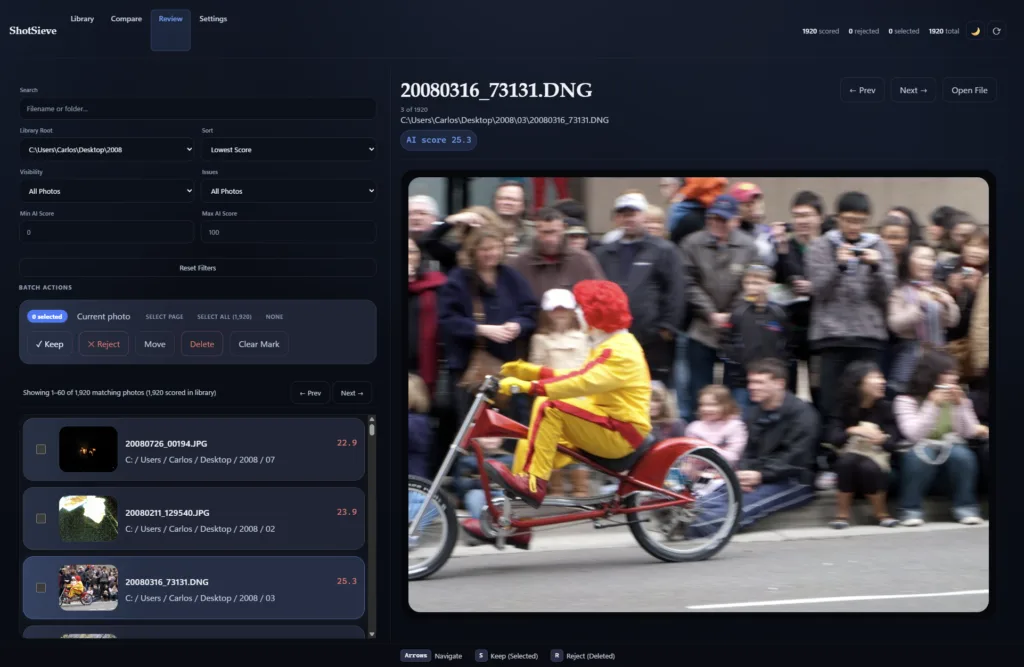
Why this AI photo culling software exists
Most photo culling tools fall into one of two camps: fully manual review, which is painfully slow on large collections, or heavy automation, where the software tries to make too many decisions for you. I wanted something in the middle instead: a tool that speeds up the boring part of the job while still allowing me to make the final decision.
In practice, the workflow I wanted was simple:
- Scan a large folder.
- Run an AI-assisted analysis.
- Narrow the set to likely keepers and likely rejects.
- Delete or move the rejects after review.
That approach saves time immediately. However, it still leaves the final review to the photographer, which is exactly how I think it should work.
What this AI photo culling software does
ShotSieve is a GUI-first desktop app for first-pass photo culling. Right now, the workflow supports:
- Folder scanning with incremental rescans and a separate reviewed cleanup process for files that are genuinely missing.
- A local SQLite cache for scan, scoring, comparison, and review state.
- JPEG preview generation for faster browser-based review.
- Learned image-quality scoring through a curated in-app model set.
- A local review UI organized around Library, Compare, Review, and Settings.
- Keep/reject actions, filtering, batch operations, fullscreen preview, and copy, move, delete, or export flows.
- Portable runtime-pack launchers for Windows, Linux, and Apple Silicon Macs.
The goal is intentionally narrow: help sort high-volume folders faster while keeping the final decision in your hands.
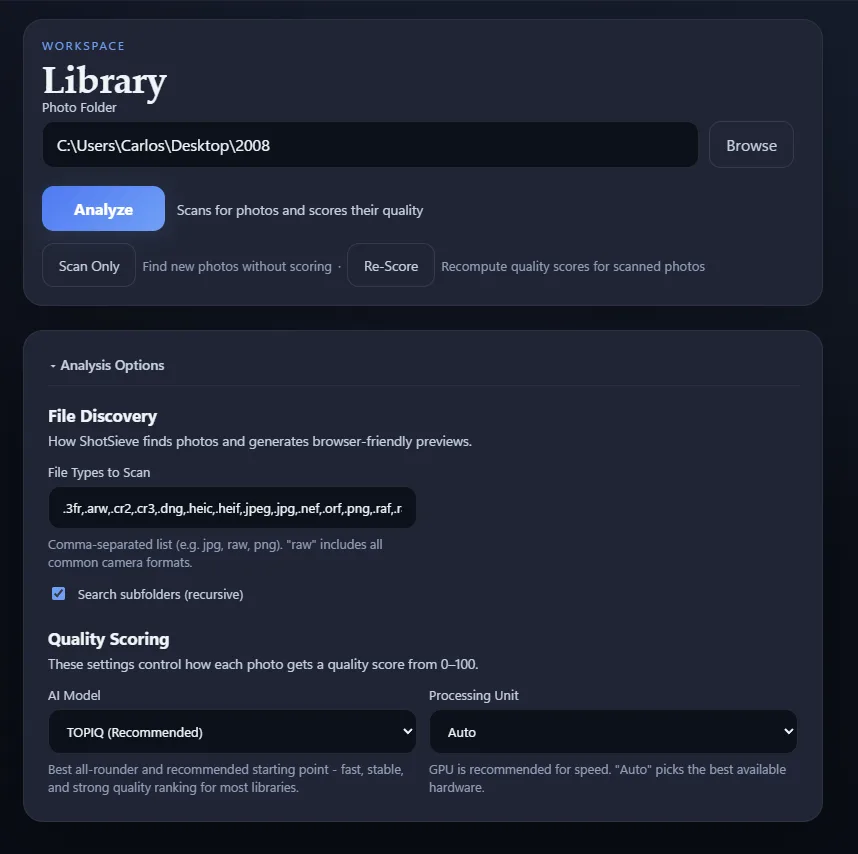
How the AI photo culling workflow works
A typical first-pass workflow looks like this:
- Launch ShotSieve.
- Choose a photo folder in Library.
- Run Analyze to scan and score supported images.
- Move into Review to mark keepers, rejects, and selections.
- Use Compare when you want to test how different models rank the same library.
- Move or delete the rejected files and clean up your collection.
As a result, ShotSieve works well as a front-end culling pass before Lightroom or any other editing and catalog workflow.
AI photo culling software models and runtime options
The in-app model catalog is intentionally small and currently centered on three learned image-quality models:
| Model | Practical role |
|---|---|
topiq_nr | Recommended default and main general-purpose scoring option. |
clipiqa | CLIP-based secondary model that provides a useful second opinion. |
qrealign-mini | Larger Q-ReAlign Mini model for an additional perceptual-quality signal. |
I recommend starting with TOPIQ for a first pass. CLIPIQA and Q-ReAlign Mini can then be useful when you want another model’s opinion on borderline images.
Q-ReAlign Mini is considerably larger than the other models, with roughly 2.2 GB of model weights, so it requires more memory, disk space, and processing time. The exact performance of every model will depend heavily on your hardware.
If you are choosing a download, the simple rule is:
- Choose NVIDIA CUDA if you have a supported NVIDIA GPU.
- Choose Intel XPU if you have a supported Intel GPU and operating system.
- Choose AMD ROCm if your AMD GPU and operating system are supported.
- Choose Apple MPS on an Apple Silicon Mac.
- Choose CPU when you do not have a supported accelerator or want the broadest fallback.
A GPU vendor alone does not guarantee compatibility. Support depends on the specific GPU, operating system, drivers, PyTorch runtime, and model. If you are unsure, CPU is the safest option, although it will generally be slower.
The current downloadable macOS packages target Apple Silicon. Intel Macs can still use a source installation with CPU scoring, but there is no packaged Intel Mac runtime.
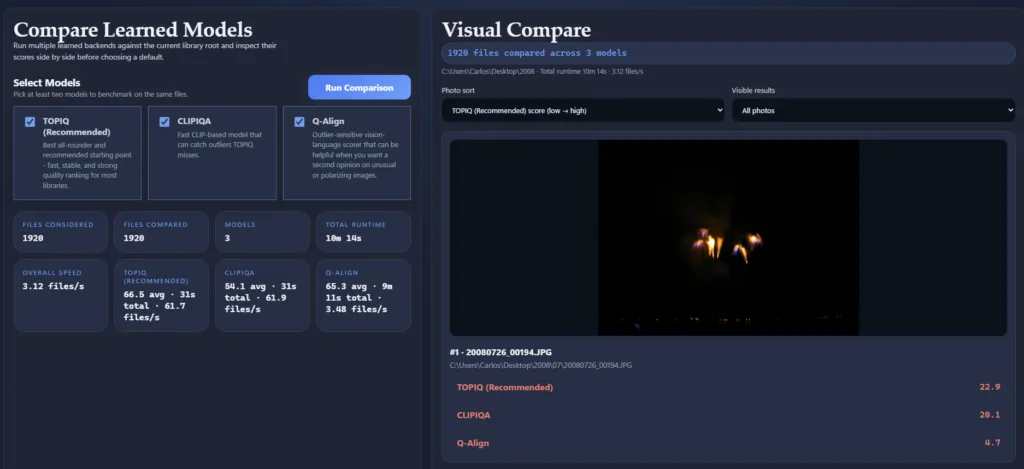
From my own use, I normally start with TOPIQ to identify obvious low-quality photos and then use CLIPIQA or Q-ReAlign Mini when I want a second opinion. Different models can react differently to blur, exposure, composition, and subject matter, so Compare is most useful for learning which model best matches your own photography before running a large culling pass.
Limitations
Any credible photo culling AI review should be clear about what AI can and cannot do.
ShotSieve can rank images by learned quality signals, but it cannot understand the full context of a photo. For example, a bokeh-heavy image may receive a lower score because the background is blurred, even when the shot is artistically correct. Likewise, if you shoot bracketed HDR exposures, the intentionally overexposed and underexposed frames may also rank as low quality. Therefore, human review is still necessary.
- Learned IQA scoring depends on subject matter, shooting style, and model behavior.
- Final human review is still necessary for story, emotion, and client-specific choices.
- Portable packages may download their local AI runtime on first use.
- Model weights are downloaded separately and are not bundled with ShotSieve.
- Third-party AI model licenses may limit commercial use.
- GPU support depends on the specific hardware, operating system, drivers, and runtime combination.
How to try ShotSieve
- GitHub repository: https://github.com/cfelicio/ShotSieve
- Quick start and package selection: https://github.com/cfelicio/ShotSieve#readme
- Build and developer guide: https://github.com/cfelicio/ShotSieve/blob/main/docs/building.md
For source installs, launch the app with shotsieve-desktop. For downloaded bundles, open the ShotSieve-* launcher that matches your platform and runtime target.
FAQ
Is ShotSieve free?
Yes. ShotSieve is a free and open-source project. The application is licensed under AGPLv3 or later. However, learned IQA libraries and model weights can have separate non-commercial or research-use restrictions, so review third-party licenses before commercial deployment.
Is ShotSieve cloud-based?
No. ShotSieve is local-first. Your photos, previews, scores, catalog data, and review decisions stay on your own machine, and image analysis runs locally.
An internet connection may be required during initial setup to download the appropriate AI runtime and selected model weights. After those components are available locally, ShotSieve does not upload your photo library to a ShotSieve cloud service.
Does ShotSieve replace Lightroom?
No. ShotSieve works better as a first-pass culling companion. Use it to reduce a large folder to stronger candidates, and then continue editing and delivery in Lightroom or your preferred editor.
Does AI photo culling replace human review?
No. ShotSieve is intentionally built around AI-assisted narrowing followed by manual review. The models can help prioritize, but the photographer still chooses the final keepers.
Which ShotSieve package should I download?
Use NVIDIA CUDA for supported NVIDIA GPUs, Intel XPU for supported Intel GPUs, AMD ROCm for supported AMD hardware, Apple MPS for Apple Silicon Macs, and CPU when you want the broadest compatibility.
GPU support depends on the specific device, operating system, driver, and runtime combination, so check the current ShotSieve README if you are unsure whether your hardware is supported.
Final take
ShotSieve is for people who need help with volume and cannot afford to manually review an entire collection looking for weak photos.
If you want AI photo culling software that scans folders, scores images locally, lets you compare models, and keeps the final keep/reject pass in your hands, ShotSieve is built for that job.
Try it out, compare the first-pass review time against your usual culling workflow, and decide whether it earns a permanent spot before your editing app. If you run into issues or have feedback, feel free to contact me.
7 Comments
Hello, I encountered an issue where the model cannot be downloaded during use. However, I am sure that the network is functioning normally. The error message is shown below. I was wondering if there are any other solutions. Thank you.
Failed to initialize learned IQA model ‘topiq_nr’: An error happened while trying to locate the file on the Hub and we cannot find the requested files in the local cache. Please check your connection and try again or make sure your Internet connection is on.
Sorry to hear that. Can you tell me what operating system you are using, and which package did you download / try?
I have the same issue – works fine with the CLIPIQA model but for topiq_nr it says:
Failed to initialize learned IQA model ‘topiq_nr’: An error happened while trying to locate the file on the Hub and we cannot find the requested files in the local cache. Please check your connection and try again or make sure your Internet connection is on.
I’m running on windows and using the DirectML package.
Its been a great tool using the CLIPIQA model, but I wonder how much better the topiq_nr model is.
Hi Chris,
Glad to hear you liked the tool! I’ll look into this issue and get back to you 🙂
Cheers,
Carlos
Hi Chris,
Turns out DirectML has been deprecated by Microsoft, so I created some new builds with ROCm for AMD and XPU for Intel, give it a try and let me know if it works. The new version also brings Q-ReAlign to a wider range of GPUs, so you can potentially have 3 models to test.
If you run into issues, let me know more details about the error you are getting, hardware and OS details, and I’ll look into it!
Hi Carlos,
Apologies but I’m having trouble locating the download link for Windows. Are you able to assist with a path or hyperlink?
Thanks
Simon
Hi Simon,
The latest version can be downloaded here: https://github.com/cfelicio/ShotSieve/releases/
Thanks!
Carlos